
To connect an LX200 to a computer you need a special cable. You can sometims buy one from the company that makes the software you’re using but it’s much cheaper to make one for yourself. The parts only cost a few dollars and it will take only a few minutes. All you need is a soldering iron, the appropriate connectors and the information below. It’s really a lot simpler that it looks.
Pin-outs
For those of you who know what you’re doing all you need to know is the pinouts:
| Description | LX200 | DIN-8 | DB-9 | DB-25 | Name |
|---|---|---|---|---|---|
| +12v DC | 1 | ||||
| Misc Serial Out | 2 | ||||
| PC Transmit Data | 3 | 3 | 3 | 2 | TxD |
| Ground | 4 | 4 | 5 | 7 | Gnd |
| PC Receive Data | 5 | 5 | 2 | 3 | RxD |
| Misc Serial In | 6 |
In the diagrams below the colors indicate which pins connect to each other.
LX200 RS232 Port

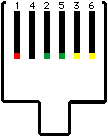
At right is a diagram of the LX200’s RS-232 port as you see it looking into the panel. Note the odd pin numbering: 1-4-2-5-3-6, read left to right looking into the port (This numbering is taken from the LX200 User’s Manual, don’t expect to see it elsewhere.)
At left is the corresponding 6-pin modular plug (RJ11) viewed from the flat side (top as it is inserted into the LX200; not the end); the connecting pins are on top, the tab on the bottom of the diagram represents the wire.
Mac Ports
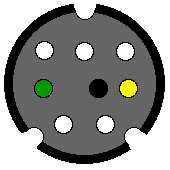
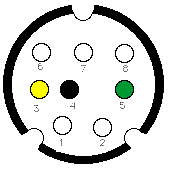
The Macintosh’s modem and printer ports use a DIN-8 jack as shown at right looking into the Mac. The diagram at left shows the pins from the end of the male plug. Of course, it’s a mirror image of the diagram of the port. The pins are usually labeled in tiny raised letters.
Making a Simple Cable
Making a cable is just a matter of wiring up the connectors with matching colors as shown below. Connect pin 3 to pin 3, pin 4 to pin 4, and pin 5 to pin 5. (The exact correspondence of numbers is purely accidental.)
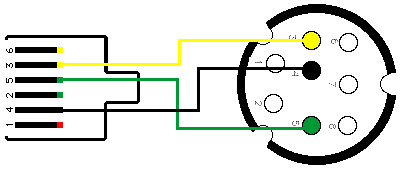
(Crossing lines do not connect)
Making a Dual Cable
Though they are labeled as “Unused” in the LX200 manual pins 2 and 6 are actually an extra RS232 port (pin 4 is a common ground). Thus you can make two simultaneous RS232 connections to your scope. This is useful if, for example, you want to connect to a computer and your CCD camera at the same time.
Connect one connector as above. For the other one, connect pin 6 to pin 3, pin 2 to pin 5, and the common ground pin 4 to pin 4.
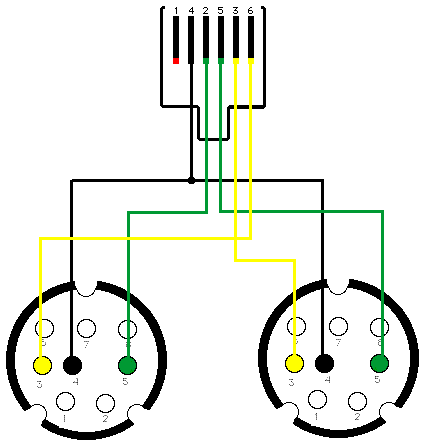
(Crossing lines connect only where a dot is shown)
Other Computers
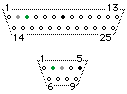
Other computers use a variety of different connectors. Most common are DB-25 (right, top) and DB-9 (bottom); they are shown here looking at the pins from the end of the male connector. Connect as for the Mac substituting per the pin-out table above.
Pin Nomenclature
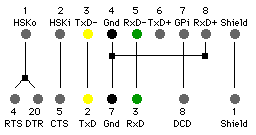
The various RS232 pins go by a confusing variety of names. Fortunately for this purpose, we need only be concerned with three of them: Ground, RxD (receive data), and TxD (transmit data).
The diagram at right shows how to connect a DIN-8 (top) to a DB-25 (below).
Richard Mathews says, “On the DIN-8, pins 5 and 8 are both Receive Data (actually RxD- and RxD+). The voltage difference between them is what matters. … To reduce noise, you should connect pin 8 to ground by tying it to pin 4. Note that your diagram for connecting a DIN-8 to a DB-25 already shows this connection, but you don’t show it in the info on connecting the RJ-11 to the DIN-8.” Richard is probably right but my cable works fine anyway.
USB
Modern computers have USB instead of serial ports. To use an LX200 with a USB computer you need a cable such as above plus a serial-USB adapter. I use a Keyspan USB Twin Serial Adapter; there are several other similar products available.
Disclaimer
Check your cable carefully before using it. A miswired cable could fry the RS232 ports on either end.
I have made a cable using this information. I have tried to make it correct. But I’m only human. If you burn up your LX200 it’s not my fault.
Notes
- The cable can be very long (100ft or more) if you want. Use heavier gauge wire for longer lengths.
- It can be somewhat difficult to solder wires to the tiny pins on the backs of these connectors. The easy way to make an LX200-computer cable is to buy a cable with an 6-pin modular plug on one end and another cable with the proper connector (DB-9 or whathever) on one end. Then cut both wires in the middle and just solder the wires together. You may have to use a meter to verify which wire is which.
- If you want to avoid splicing wire, special tools for working with modular plugs are available
- You can actually use a 4-pin modular connector if you can’t find a 6-pin one. It will connect to the middle 4 pins of the jack. (But, of course, this won’t work for the dual cable.)
- Though the LX200’s port uses the same connector as your modem it will not work with a modem. Do not use a simple phone cord to connect your LX200 to a modem or to a phone line.
- Pin 1 of the LX200’s port is a 12vDC source. But don’t expect it to deliver much current.
- The LX200’s CCD port is just for moving the scope; it just runs the motors. Some CCD cameras can also use an RS232 port for fuller control of the LX200.
- You can buy all the parts and tools you need from any electronics supply outlet such as DigiKey or Newark.
- For info on LX200 cables see Information about Plugs and Cables by R. A. Greiner.
- Constructing an RS232 cable for a Magellan I by Alistair Symon (Alistair believes this will also work for a Magellan II)
- How to control the LX-200 from a handheld PC by Matt Considine
- Robert B. Denny’s nifty Astronomer’s Control Panel for the Meade LX-200 Telescopes
- Infogenie plugin for Starry Night
- If all this is too much hassle, you can buy ready-to-use cables from Charles Turner
Credits
This page was made possible by the generous contributions of Don Dillinger, Michael Hart and others on the MAPUG mailing list (plus a little help from the LX200 manual, appendix F). I am grateful for their help but any mistakes are mine.
Bill Arnett; last updated: 2002 Feb 28